If you haven't found where to look for these yet, they can all be downloaded from this page: Handout Link
The lunch session that myself and Eddie participated in does not have the handout posted yet. Its done, I'm just currently waiting for my web host to get it posted.
Sunday, October 12, 2008

Friday, October 10, 2008
20k and Counting
Well, I find it remarkable that enough people have been reading this blog to make it over 20,000 hits. I wanted to take a quick moment to thank everyone that takes the time out of their busy schedule to read my blog. The face lift I just gave my blog made life so much easier to control what goes on the side bar as well as posts I make. U.S. CAD had previously wrapped my blog to have it match other company blogs, but I found it too limited. When they get the chance to re-wrap using Bloggers new tools then it will likely get updated then. I've added RSS feed icons to the side bar on the left and bottom of the page, added enhanced functionality to the archived post list along with a couple other things.
With SCCS behind me, I'm deep into preparing for my class I'm teaching at Autodesk University 2008. I would like to thank in advance the 200 individuals who have already signed up for the class "Implementation Tools and Techniques That No CAD Manager Can Live Without" and filled it to the brim. I look forward to presenting to you.
With SCCS behind me, I'm deep into preparing for my class I'm teaching at Autodesk University 2008. I would like to thank in advance the 200 individuals who have already signed up for the class "Implementation Tools and Techniques That No CAD Manager Can Live Without" and filled it to the brim. I look forward to presenting to you.
Thursday, August 28, 2008
Masking AutoCAD and ACA content
Have you ever wanted to hide both AutoCAD and AutoCAD Architecture content such as lines, hatches, text, walls, doors and windows? Well, a Wipeout will only work on AutoCAD content and an Mask Block will only work on ACA content. The solution? Something I haven't had to use in a while but was brought off the shelf for a customer recently - the AEC Polygon tool.
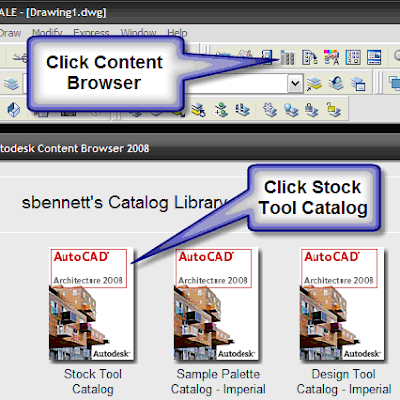
To find this tool, do the following (see images):
* Click your Content Browser
* Click the Stock Tool Catalog
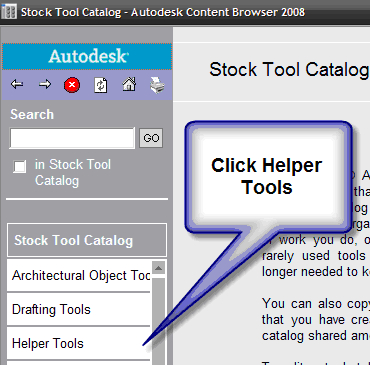
* Click Helper tools
* Click AEC Polygon tool eye dropper
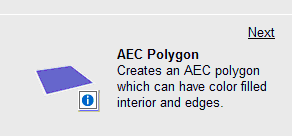
Then, fill the eye dropper up, drag to model space and pick points to outline the area you want to hide (similar to picking points for a wipeout). You can edit the AEC Polygon style to set specific things you want it to do such as using a Background Mask, telling the edges to be set to a no plot layer, etc.
Its a fairly simple Style to control in ACA since there are few options for it, but should greatly simplify your creation of areas to mask.
To find this tool, do the following (see images):
* Click your Content Browser
* Click the Stock Tool Catalog

* Click Helper tools

* Click AEC Polygon tool eye dropper

Then, fill the eye dropper up, drag to model space and pick points to outline the area you want to hide (similar to picking points for a wipeout). You can edit the AEC Polygon style to set specific things you want it to do such as using a Background Mask, telling the edges to be set to a no plot layer, etc.
Its a fairly simple Style to control in ACA since there are few options for it, but should greatly simplify your creation of areas to mask.
Thursday, August 14, 2008
Getting Zapped
Well I finally got thru my most anticipated class at Siggraph. It was entitled "Miraclels and Magic: mental ray in Photo-real Rendering for Production" - delivered by the one and only Zap Anderson. I am so hyped up on the brain dump I just got. So much info and no where near enough time for him to cover everything. I got so much info from an hour and a half that it will take me several weeks to digest it all! He covered everything from gamma and how it works on monitors, computers, softwares & also in MAX and then proceeded to answer my deepest questions on what many settings do within mental ray. I hope to be able to share these things in upcoming posts.
Subscribe to:
Posts (Atom)


